

Admins: Accessing Funraisin Support
Fundraising teams juggle a wide range of responsibilities, from managing campaigns and events to supporting donors and participants. When questions arise, or something doesn't work as expected, having access to the right guidance can help keep things moving and ensure supporters continue to have a positive experience.
Funraisin provides a range of support resources designed to help admins find answers, build confidence using the platform, and access assistance when needed. From self-service documentation and training to direct support from the team, there are multiple ways to get help.
This article outlines the support options available to admins, how to contact the Funraisin Support team, and tips for submitting effective support tickets.
What support is available?
Funraisin admins can access guidance, training, and platform assistance through the following options:
Additional free support
Once a website is launched to the public, each charity can access additional free support, as outlined in the Subscriber Agreement. Additional free support requests include up to 30 minutes of work, and Funraisin aims to complete no more than one request per day during support hours.
Additional free support covers requests such as:
- UI improvements and styling updates using HTML, CSS, or JavaScript.
- Content population and image updates.
- Basic graphics, such as buttons, banners, and headers.
- Help with custom reports.
- Advice on getting the most out of the platform.
- Optimizing CSS, JavaScript, and images.
If it’s unclear whether a request qualifies, submit it as a support ticket, and the Funraisin Support team will confirm.
Requests that need more than 30 minutes of work, such as website redesigns, landing page design, or custom development, fall outside additional free support. In these cases, the Funraisin Support team will advise and suggest an alternative.
Requests are worked on during support hours, but resolution timeframes can vary and aren’t guaranteed.
No paid work will be carried out without written approval from the charity.
Support tickets
Submitting a support ticket is the primary way for admins to contact the Funraisin Support team.
Support tickets can be used to ask questions, request guidance, or get help with platform-related tasks. Once submitted, each request will be reviewed, and a member of the team will respond as soon as possible.
Where possible, the Funraisin Support team will provide steps, tips, or guidance to help admins resolve issues and manage the platform with confidence.
If a request involves complex customizations, an event or appeal build, or work that is better suited to a project-based approach, it may be referred to the Projects team for further support.
For tips on what to include when submitting a ticket, see the Best practices for submitting support tickets section below.
Phone support
Phone support is available during the business week for time-sensitive inquiries.
When calling, it helps to have the site URL and details of the inquiry ready. Depending on the nature of the issue, the Funraisin Support team may need time to investigate and may create a support ticket to continue the conversation.
While the team will always do its best to assist during the call, some issues may require follow-up after further review.
USA & Canada: +1 512 360 0552
UK & EU: +44 204 571 3873
AUS & NZ: +61 2 8527 0520
Bookable training
Bookable training sessions are available in each region, giving admins the opportunity to work directly with a member of the Funraisin team on specific questions, goals, or areas of the platform.
To get the most out of these sessions, Funraisin recommends reviewing the Knowledge Base and on-demand training videos before booking. This allows training time to be focused on each organization's specific requirements and objectives.
To book a session, select the relevant region:
On-demand training
A range of pre-recorded training sessions is available for admins to watch at a time that suits them. These sessions cover key areas of the platform and common administrative tasks.
As a good place to start, Funraisin recommends all admins watch the following training:
Knowledge Base
The Funraisin Knowledge Base contains support articles covering a wide range of topics, including event setup, reporting, entrants, and donations.
The Knowledge Base is regularly updated with new and improved articles to help answer common questions and support admins using the platform.
Support hours
The Funraisin Support Team provides support 24 hours a day, Monday through Friday, with team members located across various regions.
Support tickets can be submitted at any time and will be reviewed by the next available team member. Depending on the nature of the request, some inquiries may require additional investigation or collaboration across teams and may be allocated to your local regional team to provide a response.
Tip! Certain support teams may be unavailable during regional public holidays. During these periods, support coverage may be provided by team members in other regions where available.
Submitting a support ticket
Support tickets can be submitted at any time, directly from the platform admin.
To submit a support ticket:
- 1
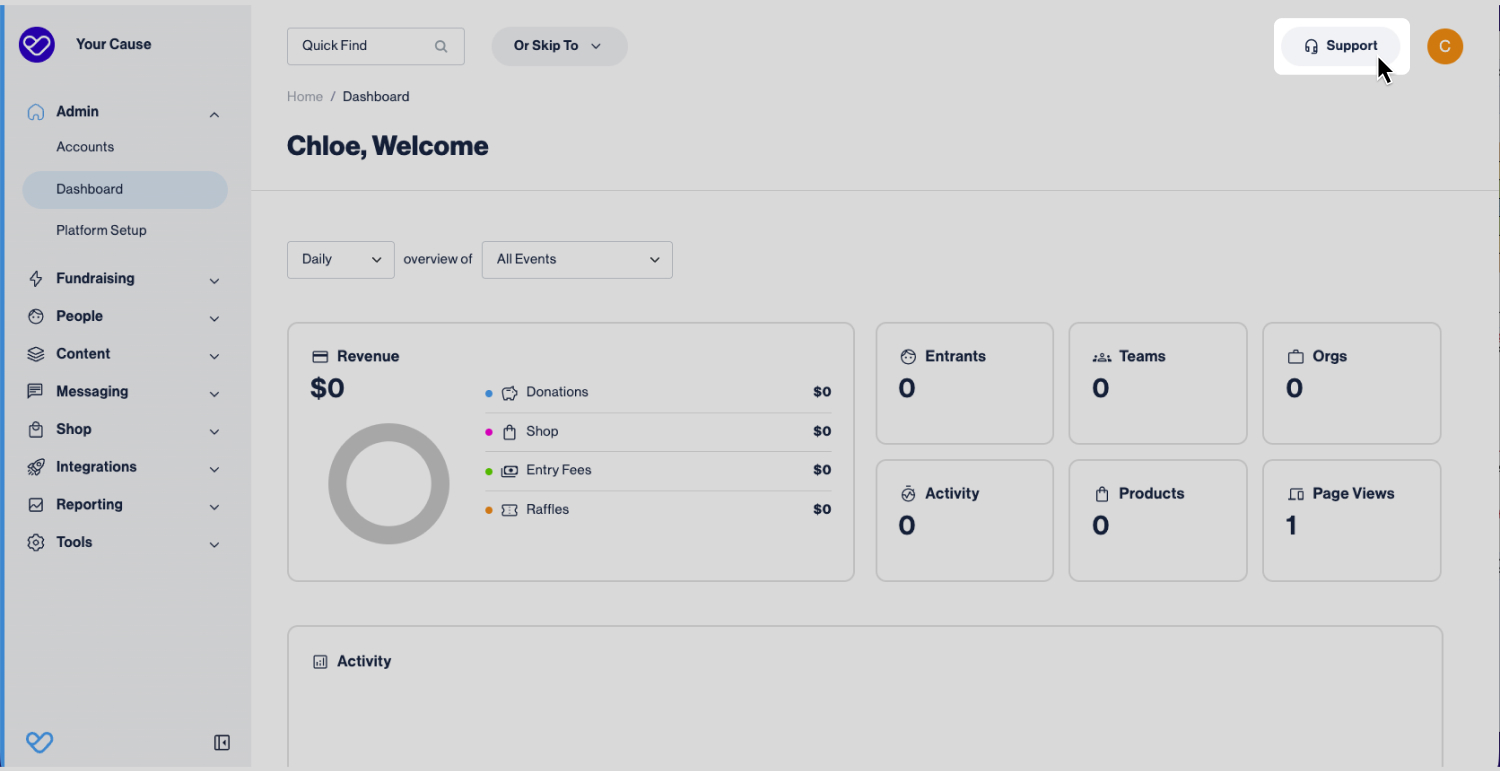
- Click Support in the top-right corner of your platform admin.
- 2
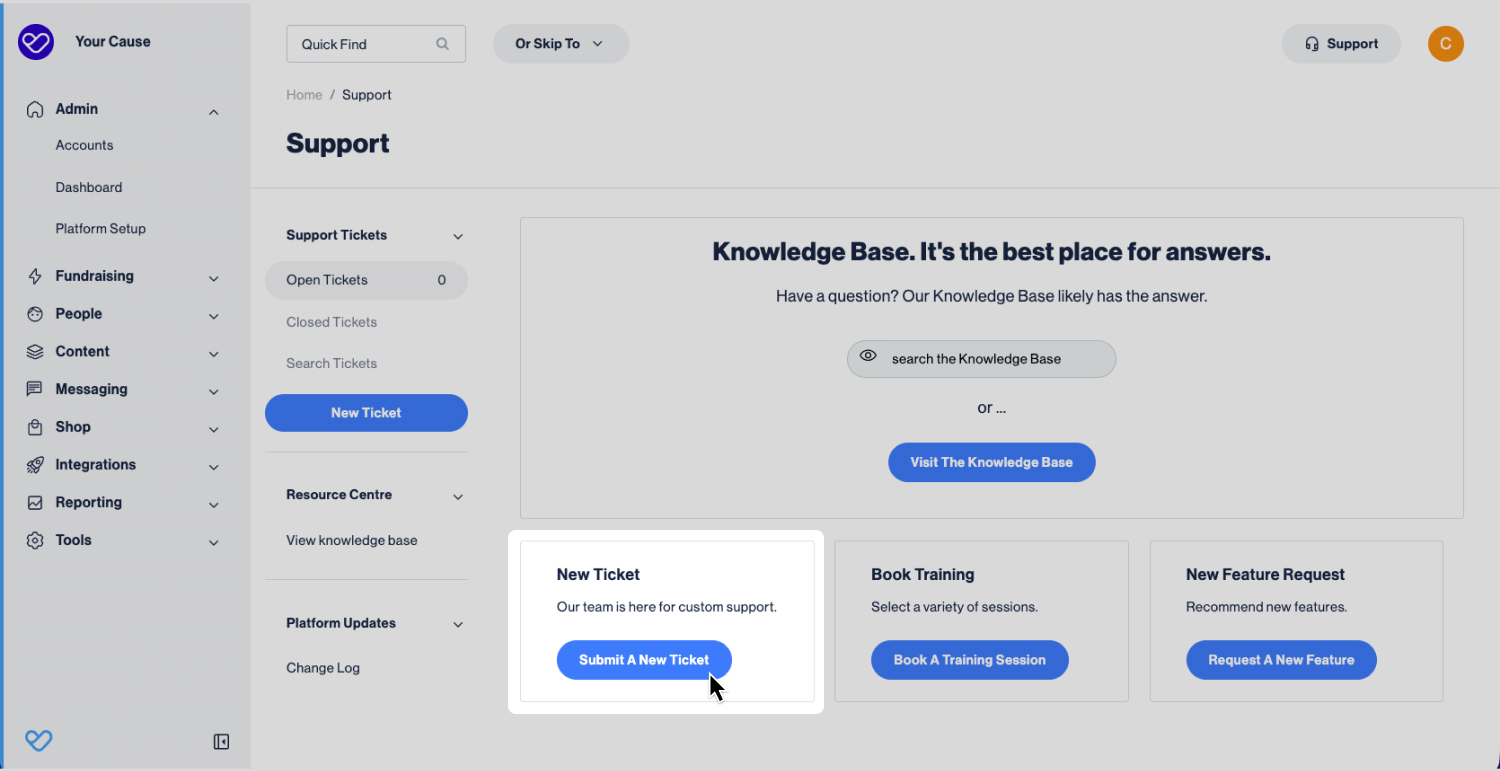
- Click New Ticket or Submit A New Ticket
- 3
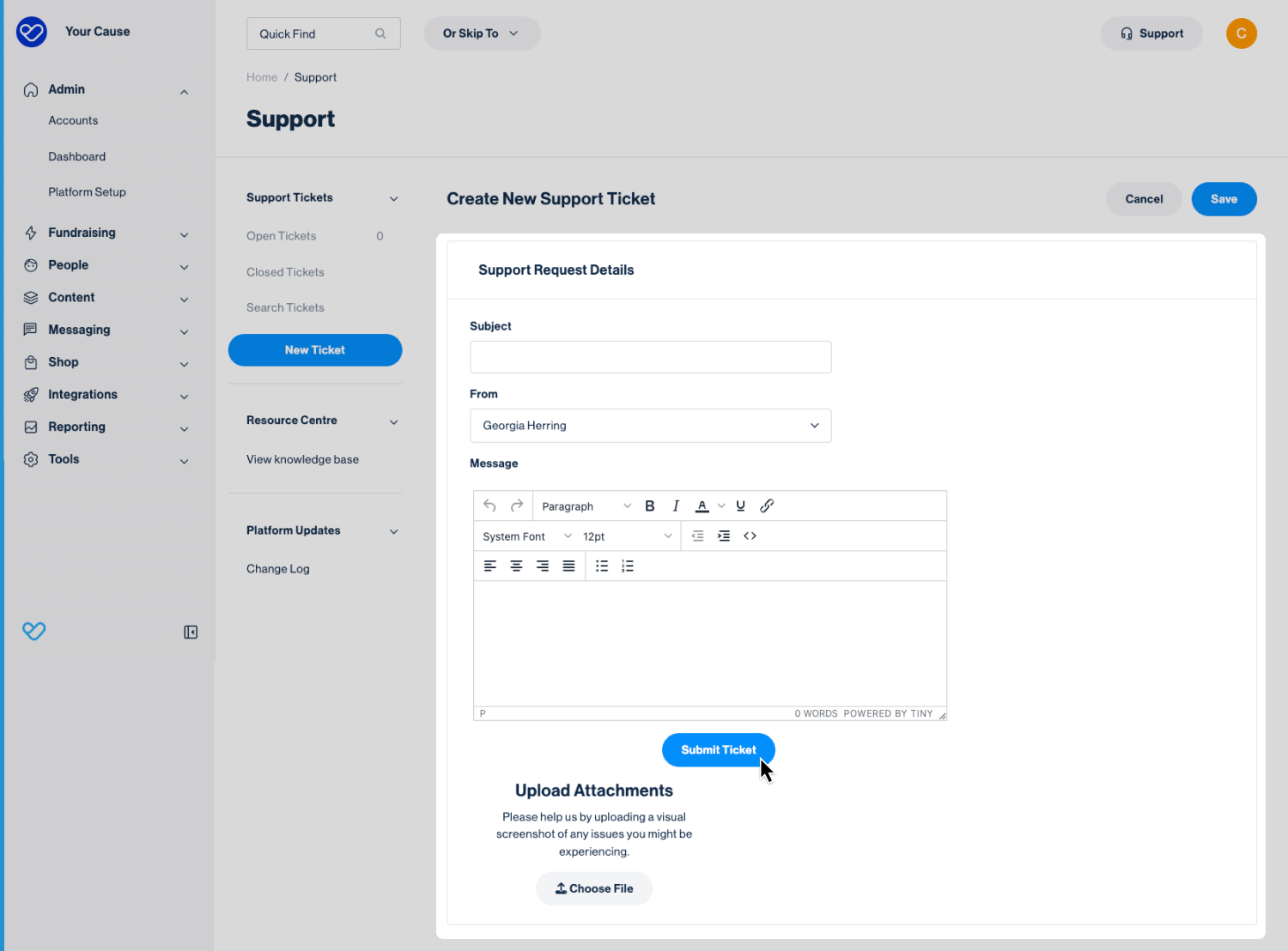
- Complete the ticket details:
- Subject: Enter a brief summary of your request.
- From: Select the admin submitting the ticket from the dropdown menu.
- Message: Provide detailed information, relevant examples, and any supporting context.
- Upload Attachments: Attach screenshots, screen recordings, or supporting files to help provide additional context.
- 4
- Click Submit Ticket
Tip! The more detail included upfront, the quicker the Funraisin Support team can help. Screenshots, screen recordings, or supporting files can be attached to any ticket to show exactly what's happening.
Once submitted, the ticket will appear under Open Tickets in the central navigation.
Replies from the Funraisin Support team are sent straight to the inbox of the admin who submitted the ticket, so there's no need to check the Support module for updates. To respond to the Support team, simply reply to the email.
Best practices for submitting support tickets
To help the Funraisin Support team investigate and resolve each request as quickly as possible, Funraisin recommends including the following when submitting a ticket:
- Provide links to the specific pages, events, fundraisers, reports, or donations the ticket relates to.
- Include full URLs rather than hyperlinking text.
- If something isn't working as expected, include a short description of what was expected to happen so the team can test and investigate.
- If links aren’t available, provide the full names or email addresses of the relevant supporters.
- Where possible, include screenshots or screen recordings.
- Provide background information about any related campaign, event, or activity.
While the Funraisin Support team are experts on the Funraisin platform, they may not be familiar with an organization's specific site, campaign, or processes. Providing as much relevant information as possible helps the team investigate each request and provide assistance more efficiently.
Still need help? Check out our other support articles or reach out to the Funraisin Support team by logging a ticket through the Support Module in your platform.
Last updated: 27 Nov 2026
