

Donations: Regular Giving Upsell
A steady base of recurring supporters can transform long-term impact, but most donors still begin with a one-time gift. Regular Giving Upsell helps bridge that gap by presenting a well-timed, low-friction nudge—right when donors are already motivated to give.
By adding this optional step to your donation forms, you can introduce the value of monthly giving in a way that feels natural, relevant, and supportive of the donor’s intent. This article walks you through how Regular Giving Upsell works, how to enable it, and how to tailor the experience to your organisation’s message and brand.
What is the Regular Giving Upsell?
The Regular Giving Upsell adds a gentle, fourth step to your donation flow designed to encourage one-time donors to become recurring givers. When a donor selects a one-time gift within the eligible amount range, this step appears before personal details and invites them to convert their donation into a monthly contribution.
The upsell is intentionally light-touch. Donors keep full control—whether they choose one of the suggested monthly amounts or continue with their original one-time gift.
The feature can be enabled on donation forms, but it isn’t available on sponsored donation forms.
How does the Regular Giving Upsell work?
The Regular Giving Upsell appears automatically when a donor chooses to make a one-time gift. After selecting their amount on Step 1, donors are shown an additional screen inviting them to convert that single gift into a monthly contribution.
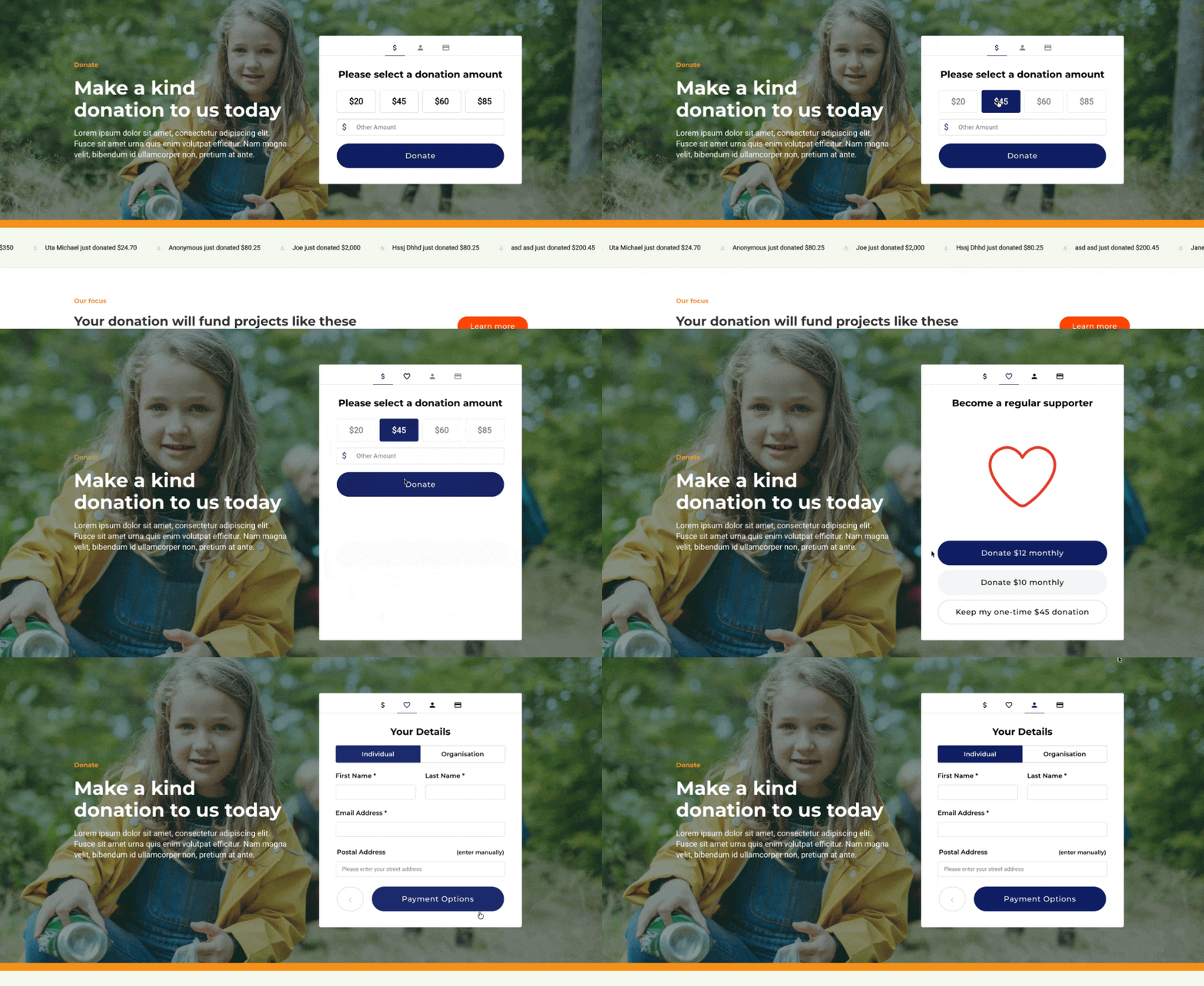
The upsell displays only when:
- The donor selects Once (or when frequency is disabled and defaults to Once)
- The chosen amount falls within the eligible range of $15–$250
If the donor chooses to upgrade, their frequency updates to monthly and the form continues as normal. If they prefer to stay with a one-time gift, they simply proceed to the next step.
The monthly options shown are dynamically generated based on the donor’s selected amount. Smaller gifts display one suggested monthly amount, while higher gifts display two—keeping the upsell relevant and easy to act on. Alongside these options, donors will always see the choice to continue with their original one-time gift, ensuring they remain fully in control of how they want to give.
Donors who select a recurring frequency from the outset never see the upsell, ensuring a streamlined journey for every giving preference.
Tip! The suggested monthly amounts are based on tested ranges shown to convert one-time donors effectively into recurring supporters.
Enabling the Regular Giving Upsell
To enable the Regular Giving Upsell on a donation form, go to your content page, open the donation form in Visual Builder and follow these steps:
- Click the heart icon to open the donation form settings.
- Go to Form > Regular Giving Upsell.
- Toggle on Enable regular giving upsell step.
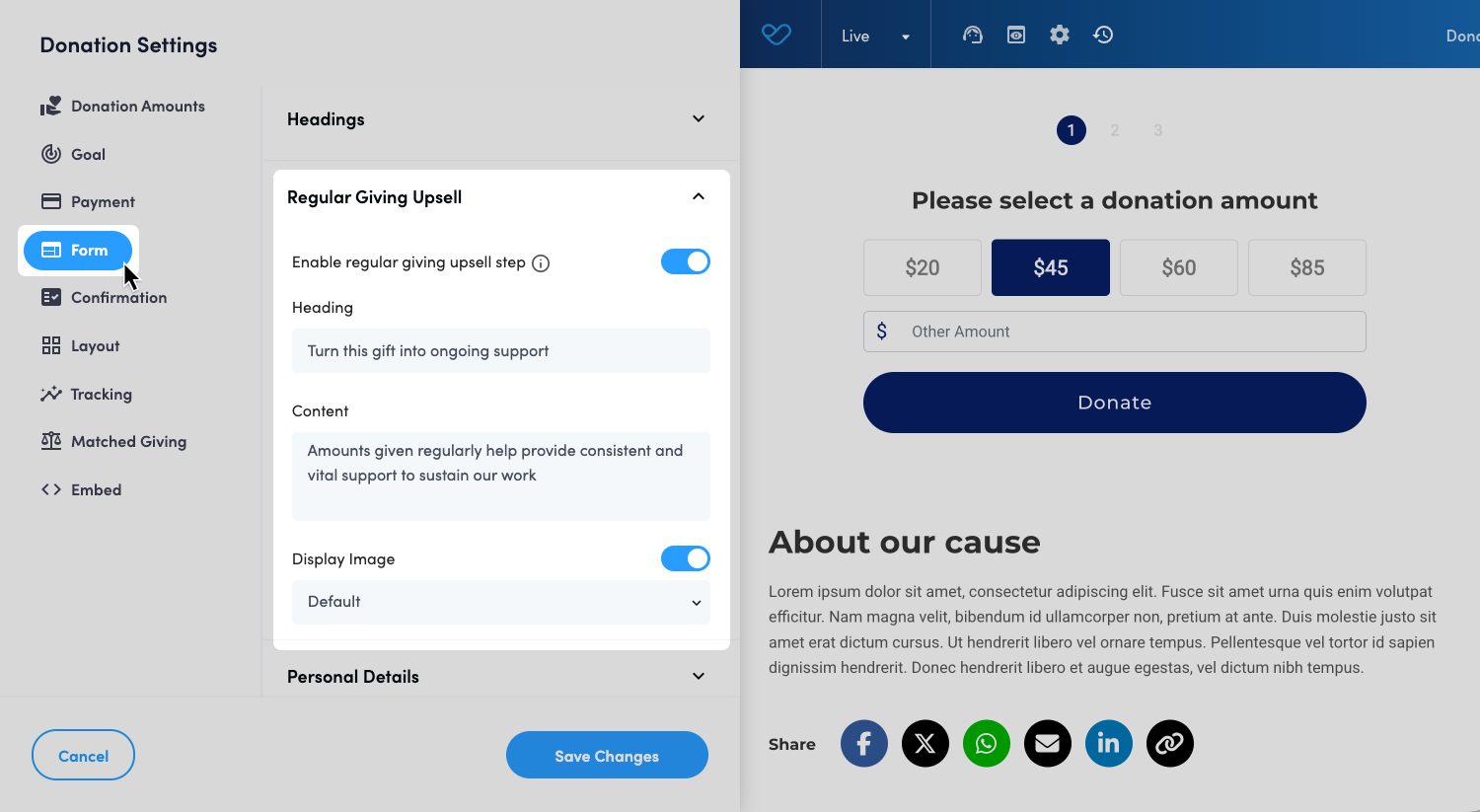
Once enabled, the upsell will appear automatically for eligible one-time donors.
Customizing the Regular Giving Upsell step
The Regular Giving Upsell step can be tailored to match your campaign’s tone and branding, helping the message feel natural within your donor journey. All customization options are managed directly within the Regular Giving Upsell section of the Donation Form settings.
You can customize:
- Heading: Add a short, compelling headline to introduce the upsell. If left blank, the default heading Turn this gift into ongoing support will be used.
- Content: Use this field to explain the impact of a recurring gift. Keep it concise and donor-focused—this is where you help them understand why monthly support matters. If left blank, the default text Amounts given regularly help provide consistent and vital support to sustain our work will be used.
- Display image: You can choose whether or not to include an image in the upsell step. The image toggle lets you turn it on or off at any time.
- Image options:
- Default image: If no image is provided, the platform will show a built-in heart GIF.
- Custom image: You can upload your own image or select one from your media library to align the upsell with your brand or campaign theme.
- Supported formats: JPG, PNG, or GIF. You can also check our recommended asset sizing guide here.
- Image options:
These options give you the flexibility to shape the upsell in a way that feels authentic to your organisation while keeping the donor experience smooth and consistent. For more information on Regular Giving, please see our support article: Enabling Regular Giving.
Still need help? Still need help? Check out our other Donations support articles or reach out to the Funraisin Support team by logging a ticket through the Support Module in your platform.
Last updated: 18 Dec 2025
