

Payments: Direct Debits
Direct debit gives supporters a simple, reliable way to commit to regular giving by authorising your charity to debit their bank account on an agreed schedule. For fundraising teams, it means fewer failed payments, steadier income, and less time spent chasing expired cards or updating details.
Once enabled through Stripe and activated on your Funraisin pages, direct debit works seamlessly alongside your other payment methods. Supporters can set up their recurring gift in a few quick steps, and you’ll be able to track, manage, and report on each debit as it’s processed.
This article walks you through everything you need to get started—from enabling direct debits in Stripe and adding them to your donation pages, to understanding the supporter experience, managing recurring donors, reporting on payments, and troubleshooting common questions.
Tip! Direct debits can only be enabled on donation pages and aren’t currently supported on fundraising pages, or registrations. Direct debit is generally used for regular giving, and while it can be enabled for one-off donations, this isn’t common practice. If you’d like to explore one-off direct debits, please reach out to the Funraisin team.
What is Direct Debit?
A direct debit is an automatic payment where a charity is authorised to withdraw funds from a supporter’s bank account on a scheduled basis. Instead of sharing card details, the supporter provides their bank account information and gives permission for the recurring debit to occur.
Direct debit is often a more reliable option for regular giving, since bank account details rarely change — meaning fewer failed payments, steadier income, and less follow-up work for your team.
Enabling in Stripe
Before you can offer direct debit as a payment option in Funraisin, you’ll need to enable it within your Stripe account. You can follow the steps in this Stripe support article to turn it on in your Stripe dashboard.
Once you’ve completed the setup in Stripe, submit a support ticket to the Funraisin team. We’ll enable direct debits on your platform so you can start using it across your donation and registration flows.
Enabling on Donation Pages
Direct debit can only be enabled from the admin and isn’t currently available in Visual Builder.
To turn on direct debit for a specific donation page:
- 1
- Edit the page you want to update
- 2
- Go to Donation Settings > Payment Settings
- 3
- Scroll down to Payment Methods
- 4
- Tick Enable Direct Debit
Once enabled, make sure to publish your page so the payment option appears to supporters.
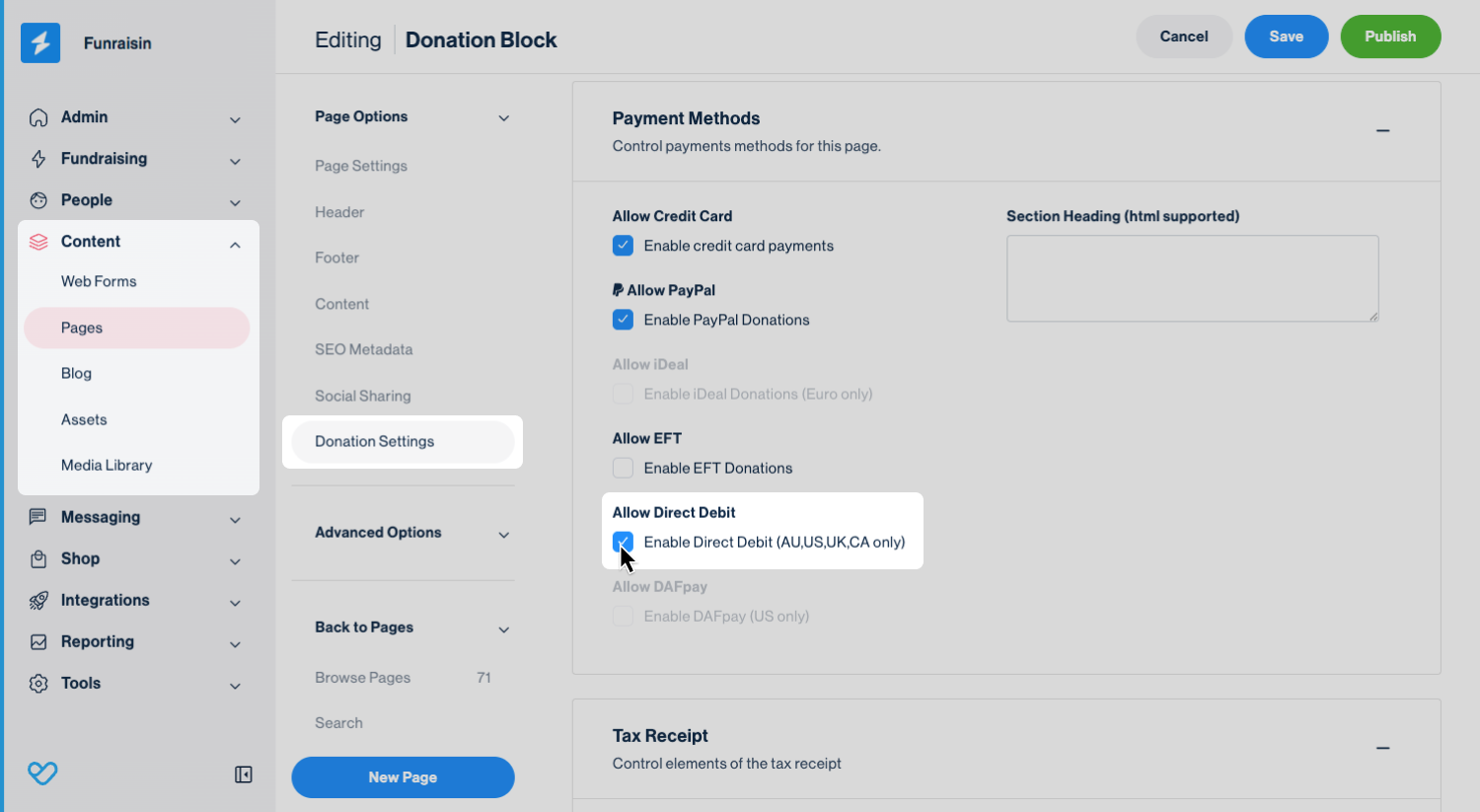
Tip! Direct debit will only appear as a payment option if it has been enabled both in Stripe and on your Funraisin platform. If you don’t see it on your donation page after publishing, double-check both settings.
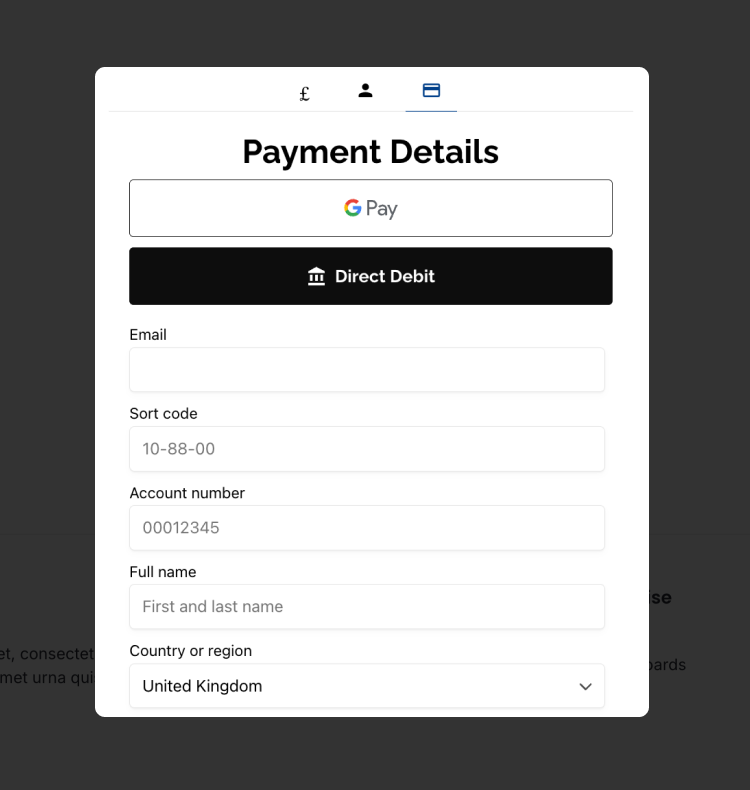
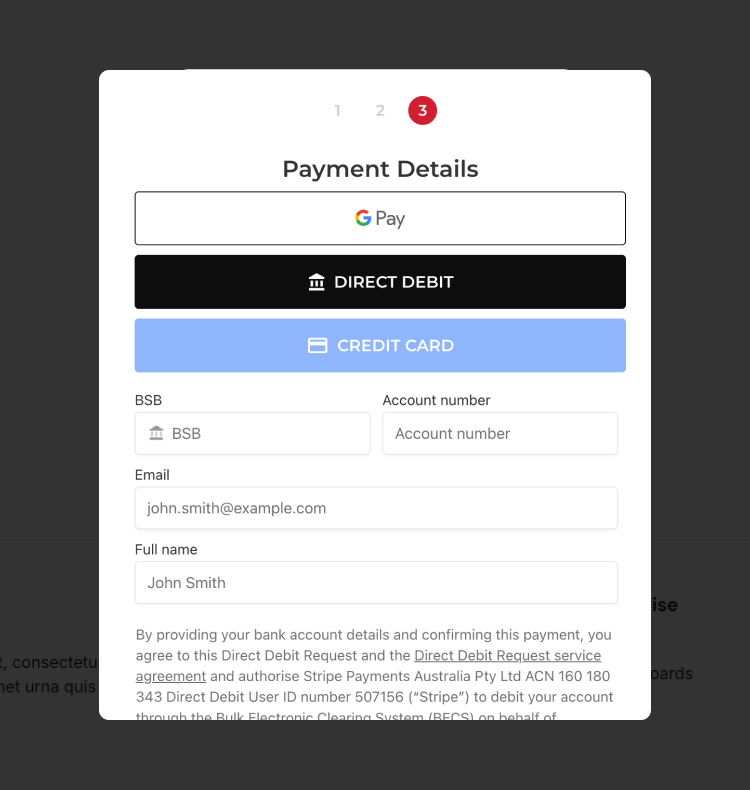
When you test your donation form, you’ll see Direct Debit appear as a payment option on the payment screen. It will sit alongside any other payment methods you’ve enabled for that page.
When a supporter selects Direct Debit, the details they’re asked to provide will vary depending on your region. The examples below show how the form fields differ based on local banking requirements.
Supporter Experience
When a supporter sets up a regular donation using Direct Debit, they’ll see a confirmation popup triggered by Stripe. This popup walks them through the final authorization step required to complete their direct debit setup, ensuring everything is securely verified before the first payment is processed.
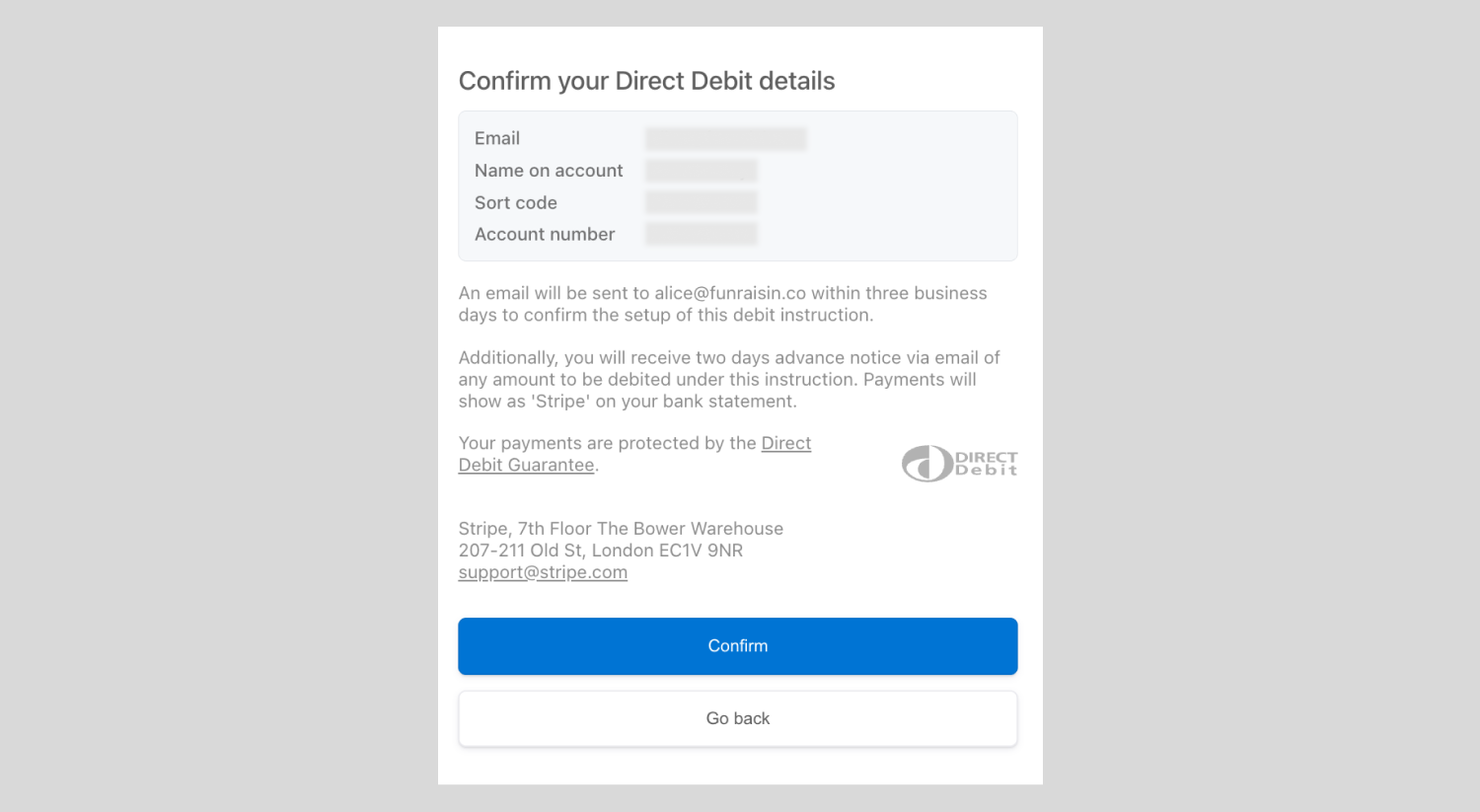
Once the supporter confirms their direct debit setup, they won’t be charged immediately. Stripe needs 3–5 days to verify the direct debit instruction with their bank before the first donation is processed.
During this period, the donation will appear as Pending in your Funraisin platform.
Even though the first debit may take a few days to process, the original day or date the supporter selected becomes their ongoing schedule. For example:
- If a donor sets up a monthly debit on 1 September, the first payment might not clear until 5 September, but all future debits will occur on the 1st of each month.
- If a donor chooses a weekly debit on Monday, the first debit might not process until Thursday, but future payments will continue every Monday.
This ensures their recurring schedule aligns with the date they intended, even if the first payment is delayed by bank processing times.
Automated Emails
Your platform includes four automated emails specifically for Direct Debit. These emails are not enabled by default, so you’ll need to review and switch them on before they begin sending.
You can edit these messages in either the Automated Emails module or the Messages module. Updates made in one area automatically sync to the other. All Direct Debit emails are global, meaning they apply to every donation or appeal page that uses Direct Debit.
- Direct Debit Confirmation:
This email is triggered when a successful one-off direct debit has been processed. It’s sent directly to the donor to confirm their payment and provide a record of the transaction. - Direct Debit Confirmation (recurring):
This email is triggered each time a recurring direct debit payment is successfully processed. It’s sent to the donor as confirmation of their latest instalment. - Direct Debit Donation:
This email is sent as soon as a donor sets up their direct debit. It confirms that their instruction has been received and notes that the first payment may take up to 5 days to process. Once the initial debit is completed, the Direct Debit Confirmation (recurring) email will be sent for that and all future successful payments. - Direct Debit Error:
This email is sent to the donor if their direct debit fails for any reason—for example, insufficient funds or a bank rejection. The payment won’t be retried automatically, so the donor will need to update their details or set up a new direct debit if they wish to continue their regular giving. - Stripe Emails:
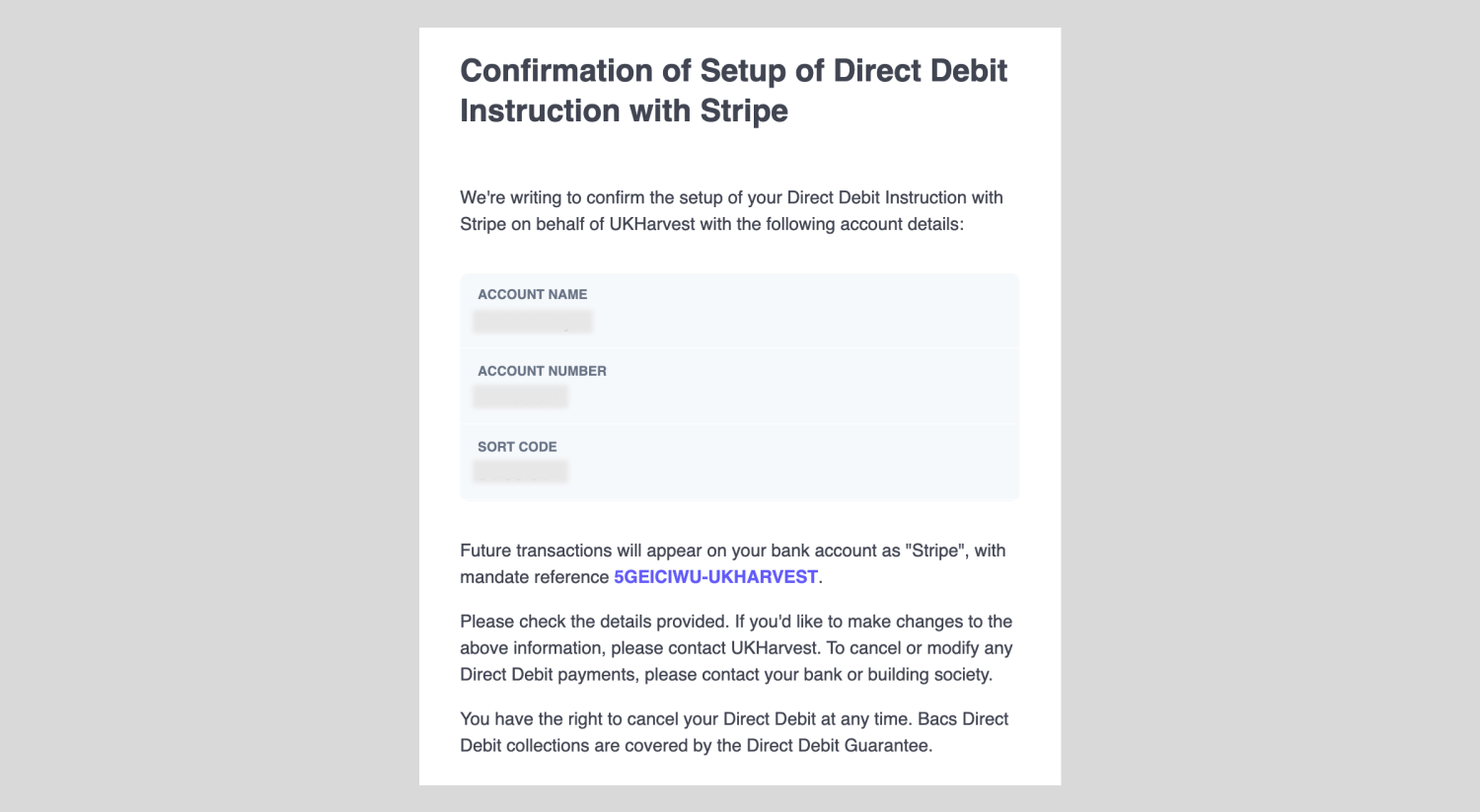
When a supporter sets up a direct debit, they’ll also receive a confirmation email directly from Stripe. This email uses the subject line Confirming setup of Direct Debit Instruction and serves as Stripe’s official record of the mandate being created.
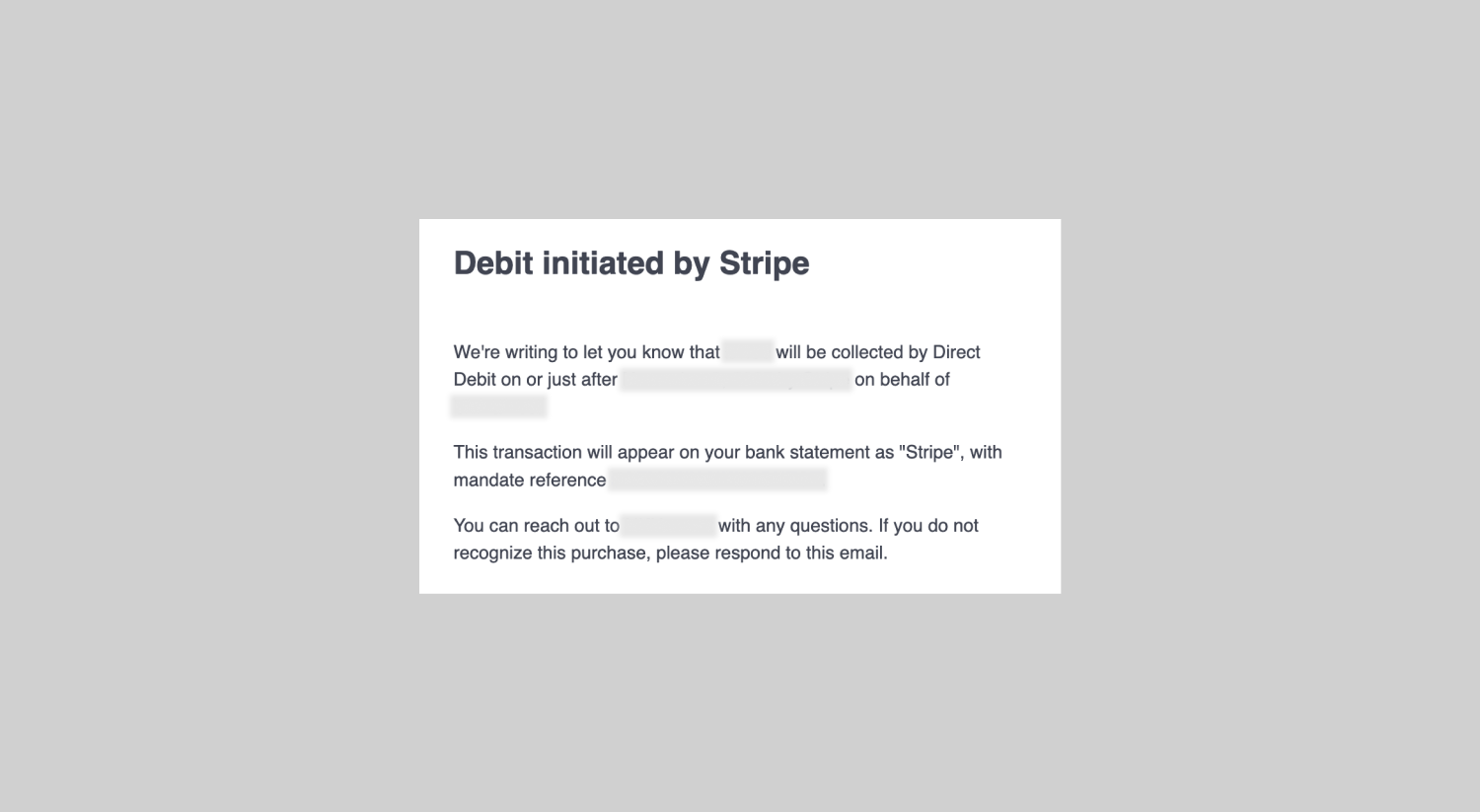
Following this, ahead of each scheduled debit, supporters will receive another email from Stripe with the subject line Debit initiated by Stripe. This message also confirms how the direct debit will appear on their bank statement, so they know exactly what to expect when the payment is processed.
Both emails are sent from support@stripe.com.
Viewing Regular Donors
You can view and manage all regular donors from the Donations module.
Navigate to: Fundraising > Donations > Scheduled Donations > View All.
This section lists every active recurring donor. From here, you can click into any record to view or edit their details.
On the overview screen, you’ll see key information for each donor, including:
- Donation amount
- Supporter name
- Donation frequency
- Term
- Number of transactions (#transactions)
- Number of errors (#errors)
- Expiry
- Status Date created
Tip! Term and Expiry only apply to donors on a fixed-term recurring schedule. #transactions shows the number of successful payments after the initial setup transaction.
When you click into a donor record, you’ll be able to view the following:
- Status: Each recurring donor record includes a status field that reflects the current state of their direct debit:
- Paused: Use this if you need to temporarily pause a donor’s regular debits. No payments will be processed until the status is changed back to Active.
- Active: The donor’s regular payments are currently running as scheduled.
- Archived: Set this status if a donor chooses to stop their recurring donation. No further payments will be attempted.
- Donor: Displays the supporter’s name along with the associated Stripe reference.
- Frequency: Shows how often their donation is scheduled to be processed (e.g., weekly, monthly).
- Term: Only relevant for donors who have committed to a fixed-term schedule.
- Payment day: Indicates the specific day of the week or month when their direct debit is processed.
- Donation amount: The amount being debited each cycle.
- CRM ID: An optional field your organisation can use to store an internal CRM reference.
- Initial donation record: Lists the donor’s name again, this time linking directly to the initial donation record.
- Donation page: Displays the page the donor originally gave through, with a hyperlink to that page.
- Payment method: Will display as Direct Debit.
- Last attempt: Shows the date of the most recent debit attempt, whether successful or failed.
Reporting
When a supporter sets up a direct debit, a donation record is created immediately. Because the first payment can take a few days to process, this initial donation will not have a transaction record linked to it right away. Once the payment is processed and approved, a transaction record is created and automatically linked to the original donation. You’ll see this reflected in your Transaction report.
For every subsequent recurring debit, Funraisin will not create a new donation record. Instead, each successful payment generates its own transaction record, which is attached to the donor’s initial donation.
Because of this structure, a Transaction report is essential if you need a complete view of ongoing direct debit activity for a particular page or campaign. A Donation report will only show the very first donation—not the recurring payments that follow.
To identify direct debit activity in your exports:
- Use the Payment method field in both Donation and Transaction reports to filter for direct debit donations.
- Use the Status field in a Donation report to find new direct debit donations that haven’t yet been processed. These will display a status of Pending.
Common Questions
Can donors update their direct debit details?
No. Direct debit details can’t be updated once they’re set. If a donor needs to change their bank account, the best approach is to archive their existing regular donation and have them set up a new direct debit.
Can a donor switch an existing credit card regular donation to direct debit?
No. Payment methods can’t be swapped on an active regular donation. We recommend archiving the current schedule and asking the donor to create a new direct debit donation.
If a direct debit fails, will Funraisin retry the payment?
No. Failed direct debits are not retried automatically. The failed payment will be voided, and the donor will be charged again on their next scheduled date (for example, in one week or one month).
Can the donor choose the exact day their direct debit is processed?
Not by default. The ongoing debit schedule follows the same day or date the supporter originally set up their direct debit. If you’d like to explore custom scheduling options, please reach out to the Funraisin team.
Can donors access their past receipts?
Yes. Supporters can view and download receipts in their donor login area. For a full breakdown of what donors can access, refer to our related support article.
Still need help? Still need help? Check out our other Payments support articles or reach out to the Funraisin Support team by logging a ticket through the Support Module in your platform.
Last updated: 18 Dec 2025
