

Please note: Intelligent Giving is currently available only to customers participating in a closed beta group. General availability is planned for a future release.
Donations: Intelligent Giving
Intelligent Giving brings AI-driven optimization directly into the donation experience. Instead of relying on static donation amounts and manual guesswork, the platform continuously adapts suggested giving amounts—responding to how, when, and where supporters are donating.
The result is a smarter donation flow that works behind the scenes to lift conversion rates and increase average donation value, without adding complexity for admins or friction for donors. Once enabled, Intelligent Giving does the optimization for you—helping every donation page perform closer to its potential.
This article covers how Intelligent Giving works, where it can be used, and how to enable it across the platform, events, and individual pages so you can confidently apply it where it will have the greatest impact.
What is Intelligent Giving?
Intelligent Giving is an AI-powered feature that dynamically suggests personalized default donation amounts for each donor. Instead of showing the same fixed dollar handles to every supporter, the platform automatically adjusts suggested amounts based on factors such as time, day of week, location, and device.
Intelligent Giving is designed to improve conversion rates and increase average donation amounts by presenting suggested values that are better tailored to individual donors.
How Intelligent Giving works
Intelligent Giving runs automatically when a donor lands on a supported donation page where the feature is enabled.
If enough information is available, the platform replaces the standard static dollar handles with optimized donation amounts. These amounts are dynamically generated and reflect signals such as time, day of the week, location, and device type.
From the donor’s perspective, the experience feels familiar:
- Suggested amounts appear in the usual dollar handle positions
- Donors can select any suggested amount
- Donors can enter a custom amount if they prefer
Nothing is required or locked in—donors remain fully in control of how much they give.
If Intelligent Giving doesn’t trigger—for example, if the system doesn’t have sufficient information—the donation form behaves exactly as it normally would, displaying the standard static dollar handles.
This ensures the feature only appears when it can add value, while preserving a consistent experience for all other donations.
Where can Intelligent Giving be used?
Intelligent Giving can be applied to specific types of donation forms, with controls available at the platform, event, and page levels, depending on the donation type.
Supported donation form types include sponsored donation forms and general donation forms.
Sponsored Donation Forms
Sponsored donations are donations made to an individual, team, or organization’s fundraising page within an online event.
General Donation Forms
Intelligent Giving can be enabled at an individual page level for one-time donations. This includes donation forms on platform-level pages and/or event-level pages. General donation forms are always controlled at the individual page or block level.
Tip! If regular giving options are enabled on a donation form, those amounts will continue to use the manually configured dollar handles.
Enabling Intelligent Giving for sponsored donation forms
Intelligent Giving can be enabled for sponsored donation pages at either the platform level or the individual event level.
Intelligent Giving is not available for personal donations made by a fundraiser during registration.
Tip! Intelligent Giving does not need to be enabled at the platform level in order to be used at the event or page level.
Platform-wide
When Intelligent Giving is enabled at the platform level, it will be automatically applied to all sponsored donation pages across all online events on your platform, unless an event is configured to use its own event-level custom donation amounts.
Platform-level Intelligent Giving does not apply to general donation forms on platform or event pages.
To enable Intelligent Giving for sponsored donation pages across all online events:
- 1
- Go to Admin, then Platform Setup
- 2
- Select Donation Defaults
- 3
- Open the Sponsored Donations tab
- 4
- Toggle Intelligent Giving on
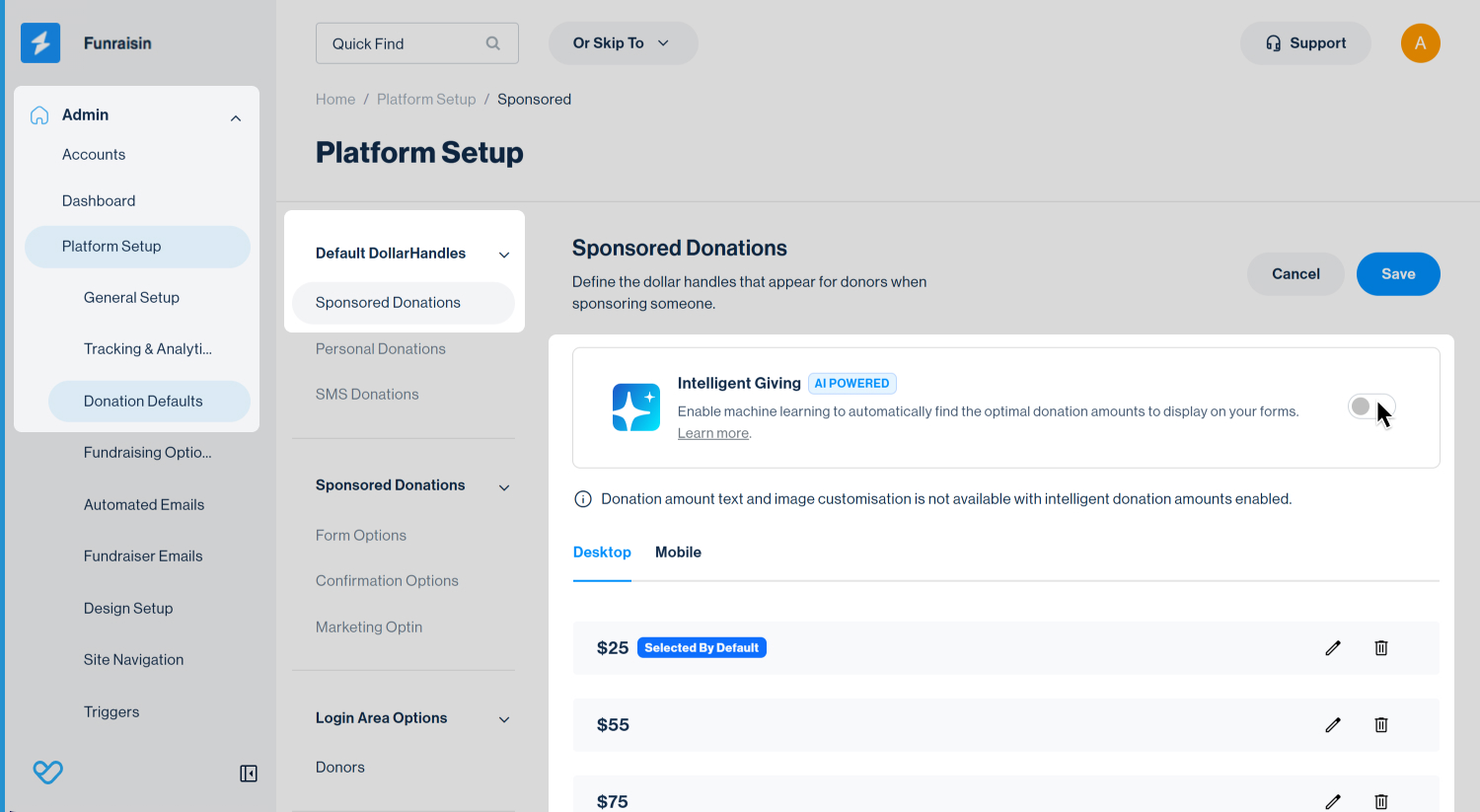
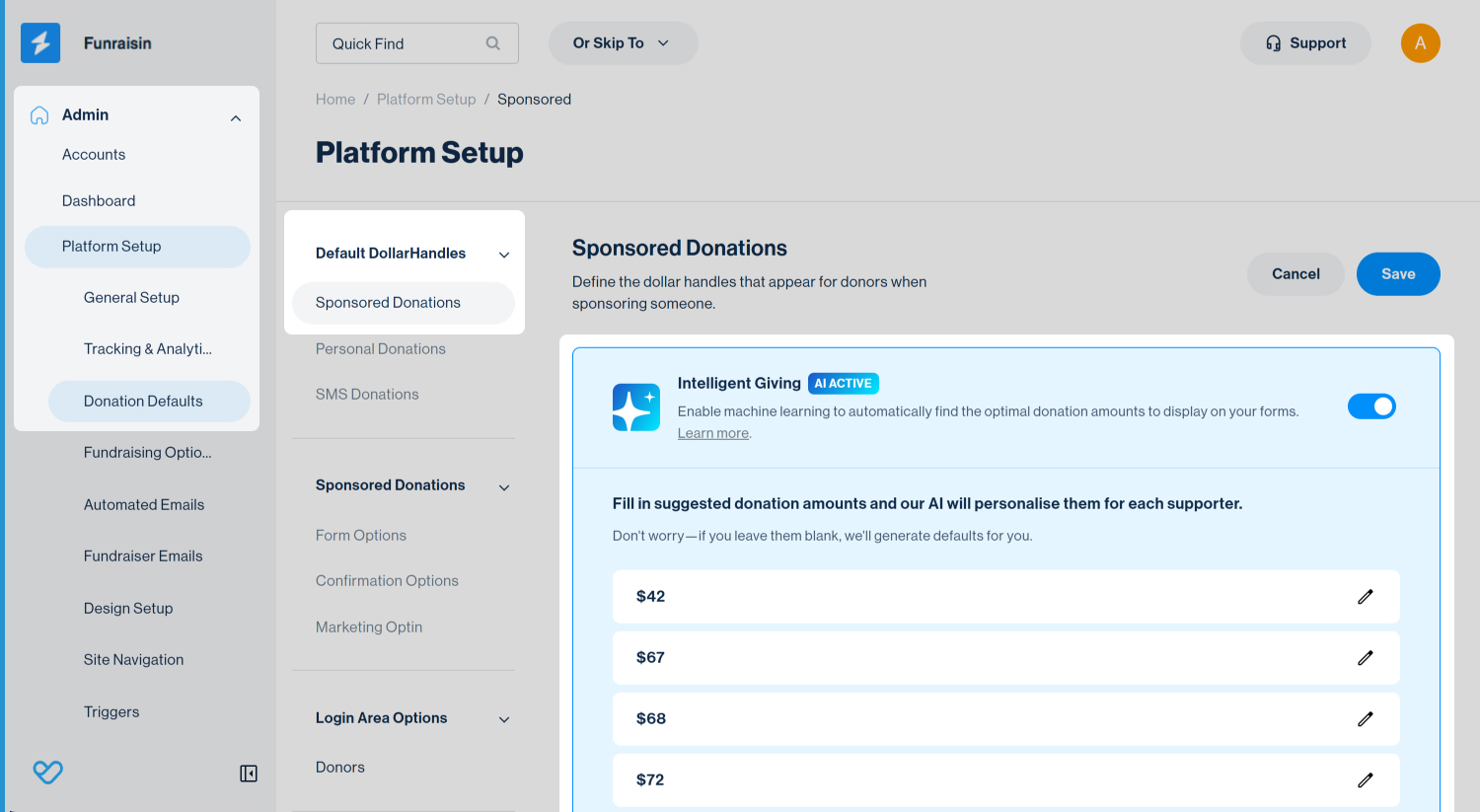
Once enabled, the platform will generate suggested donation amounts for sponsored donation pages that are configured to use platform-level donation settings.
Event Level
Event-level settings allow you to control how Intelligent Giving behaves for sponsored donation pages within a specific event.
At the event level, you can choose whether sponsored donation pages use platform default settings or custom donation amounts specific to that event.
Platform Defaults: Uses the sponsored donation settings defined at the platform level. If Intelligent Giving is enabled at the platform level, it will apply to sponsored donation pages in this event. If Intelligent Giving is not enabled at the platform level, standard static dollar handles will be used.
Custom donation amounts: Allows you to define donation settings specifically for this event. Selecting this option ignores platform-level sponsored donation settings for this event.
Tip! Using custom donation amounts optimises suggested values based on donation behaviour within that specific event. Using platform defaults applies optimizations based on donation behaviour across the wider platform.
To enable Intelligent Giving for sponsored donation pages within an event:
- 1
- Go to Fundraising, then Events
- 2
- Click the edit icon for the event to open the event settings
- 3
- Go to Donation Defaults
- 4
- Choose either Platform Defaults or Custom Donation Amounts
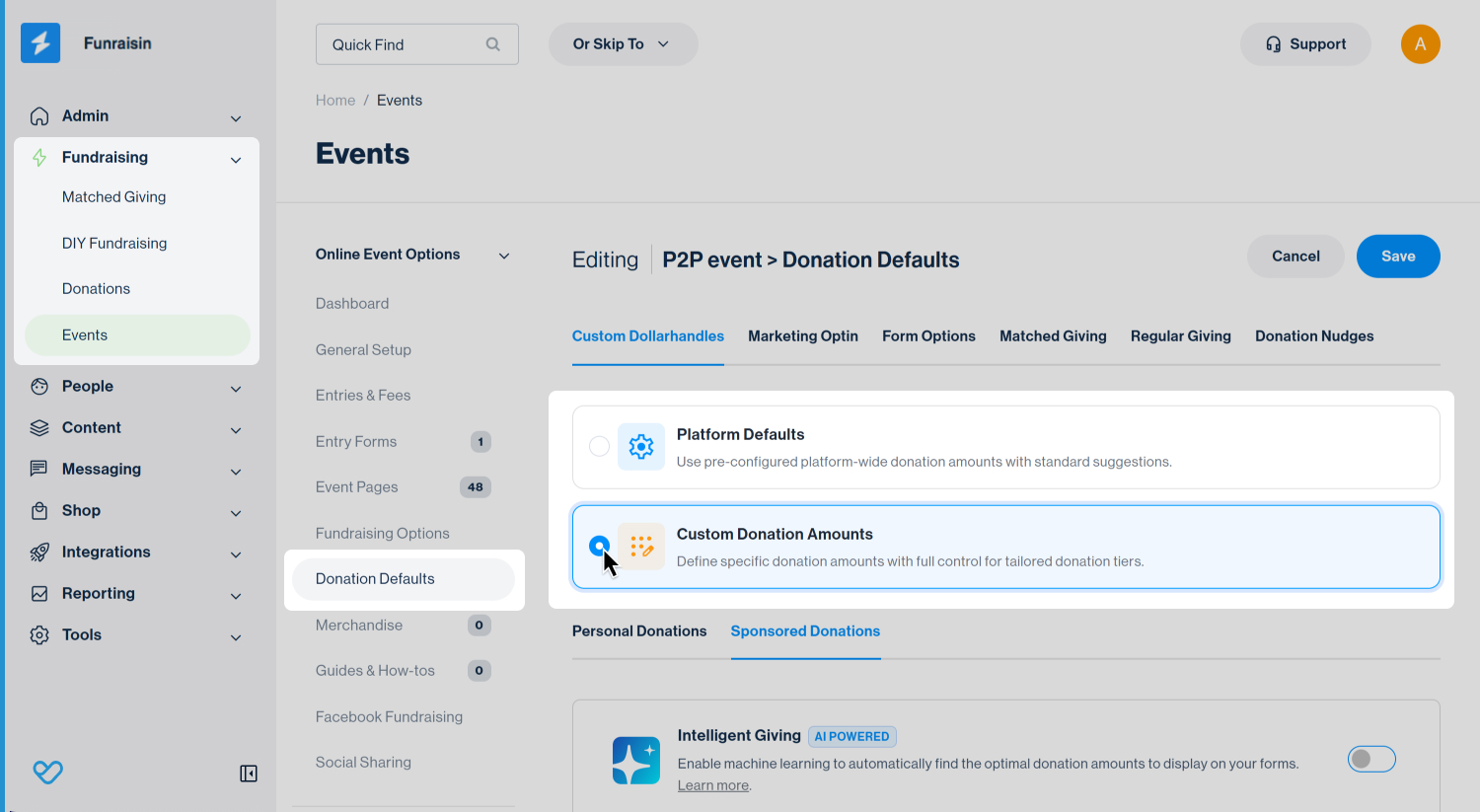
If Custom Donation Amounts is selected:
- 5
- Open the Sponsored Donations tab
- 6
- Toggle Intelligent Giving on
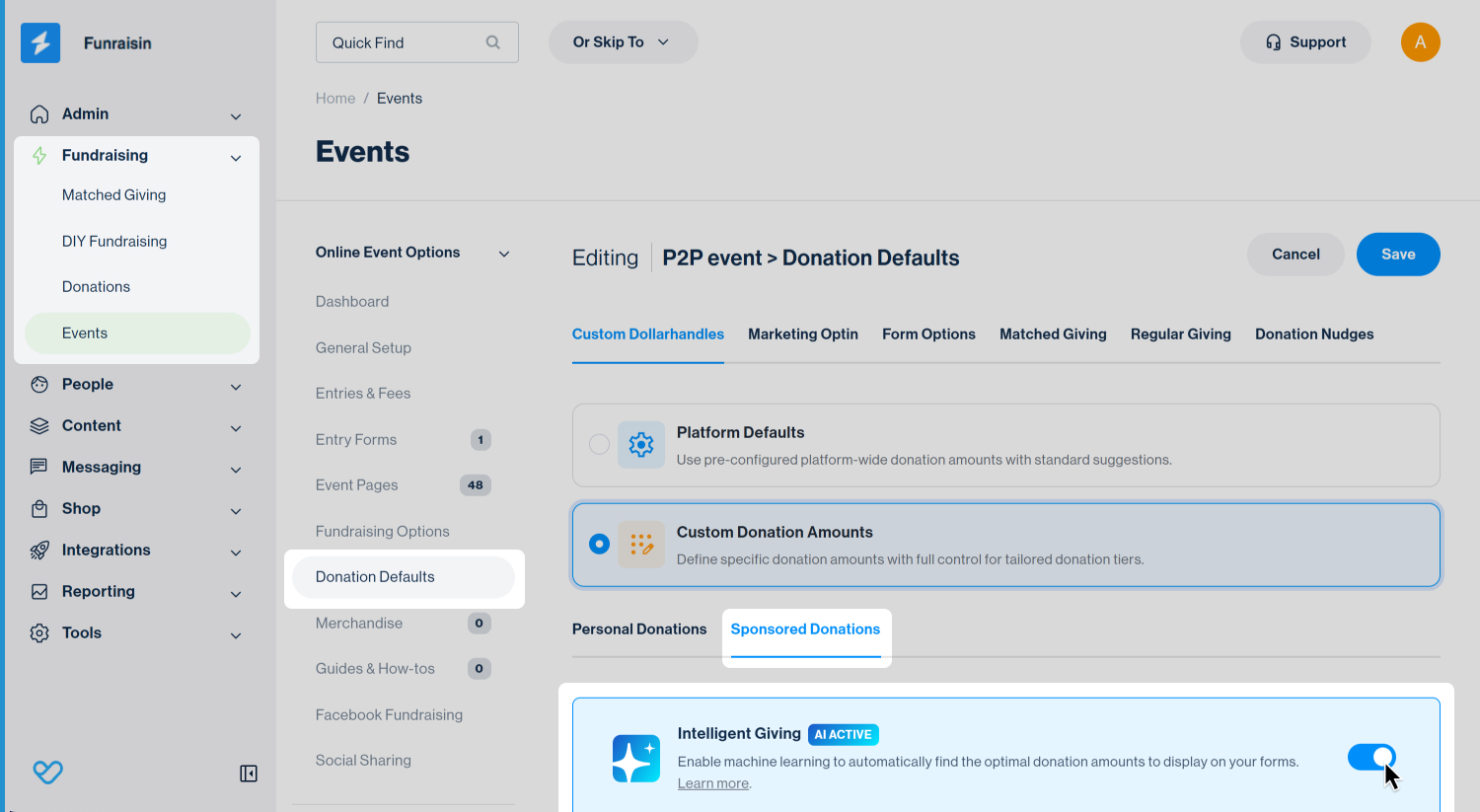
Once enabled, Intelligent Giving will apply to sponsored donation pages within the event, using dynamically generated amounts where available.
Enabling Intelligent Giving for general donations forms
Intelligent Giving can be enabled for one-time donations on general donation forms, including forms on donation and crowdfunding pages, as well as donation blocks added to other content pages. Configuration is managed at the individual page or donation block level, regardless of whether the page sits at the platform level or within an event.
Platform level pages
Intelligent Giving for platform-level pages can be enabled either through Visual Builder or page settings.
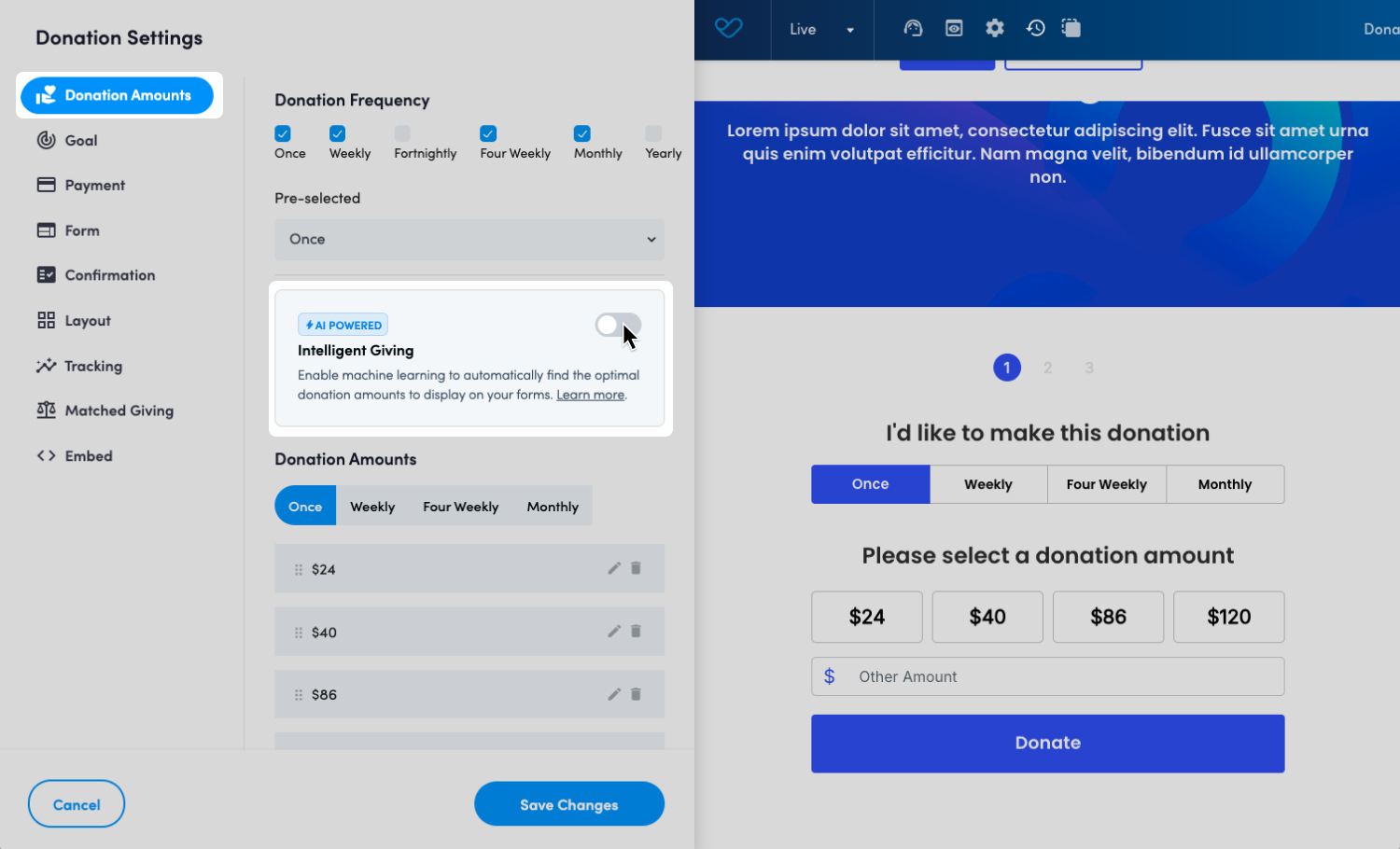
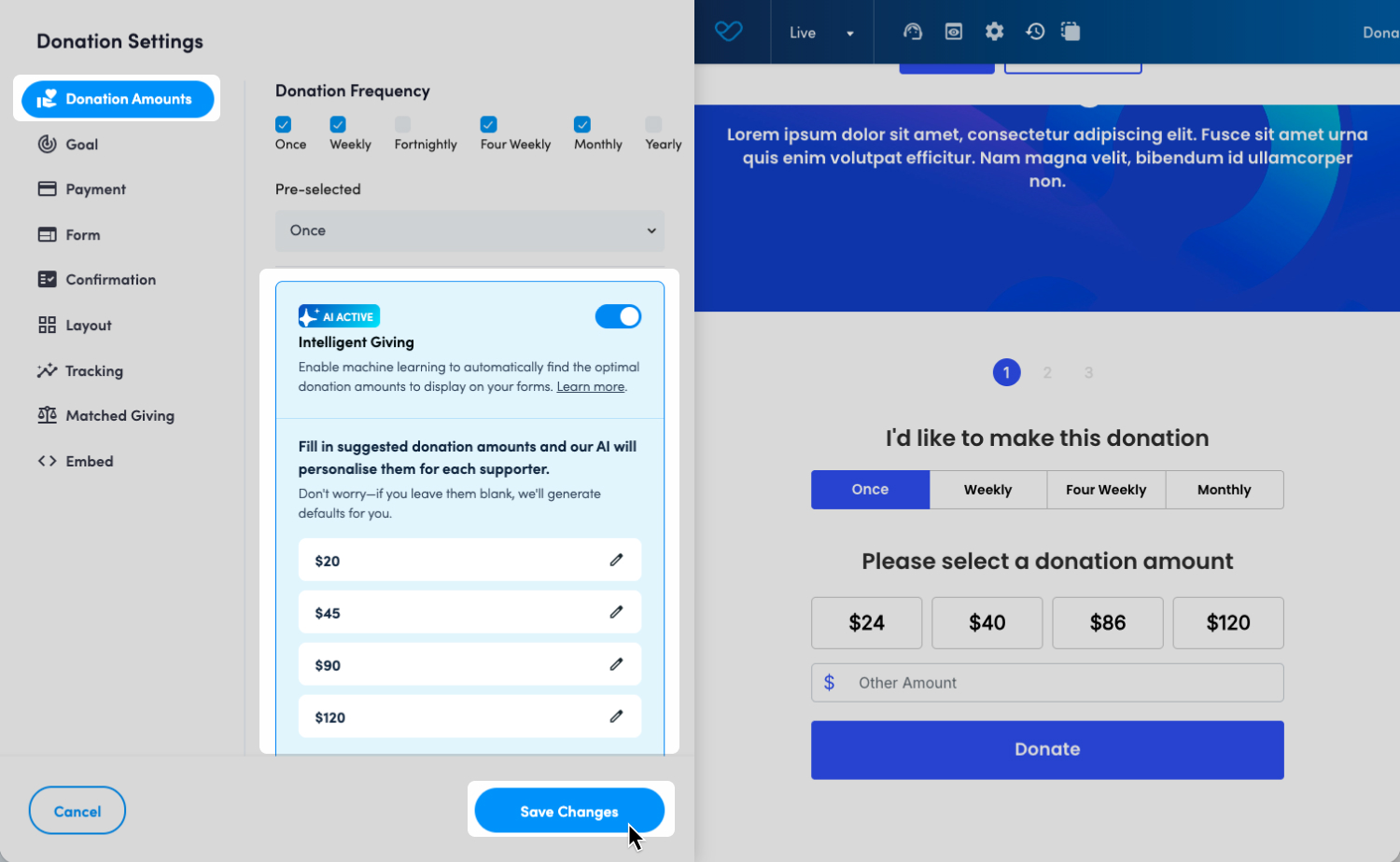
To activate Intelligent Giving using Visual Builder:
- 1
- Locate the page by navigating to Content > Pages
- 2
- Click Visual Builder to open the page and launch the Visual Builder toolbar
- 3
- Hover over the donation panel and click the heart icon to open donation settings
- 4
- Go to the Donation Amounts tab
- 5
- Toggle Intelligent Giving on
- 6
- Click Save and then Publish
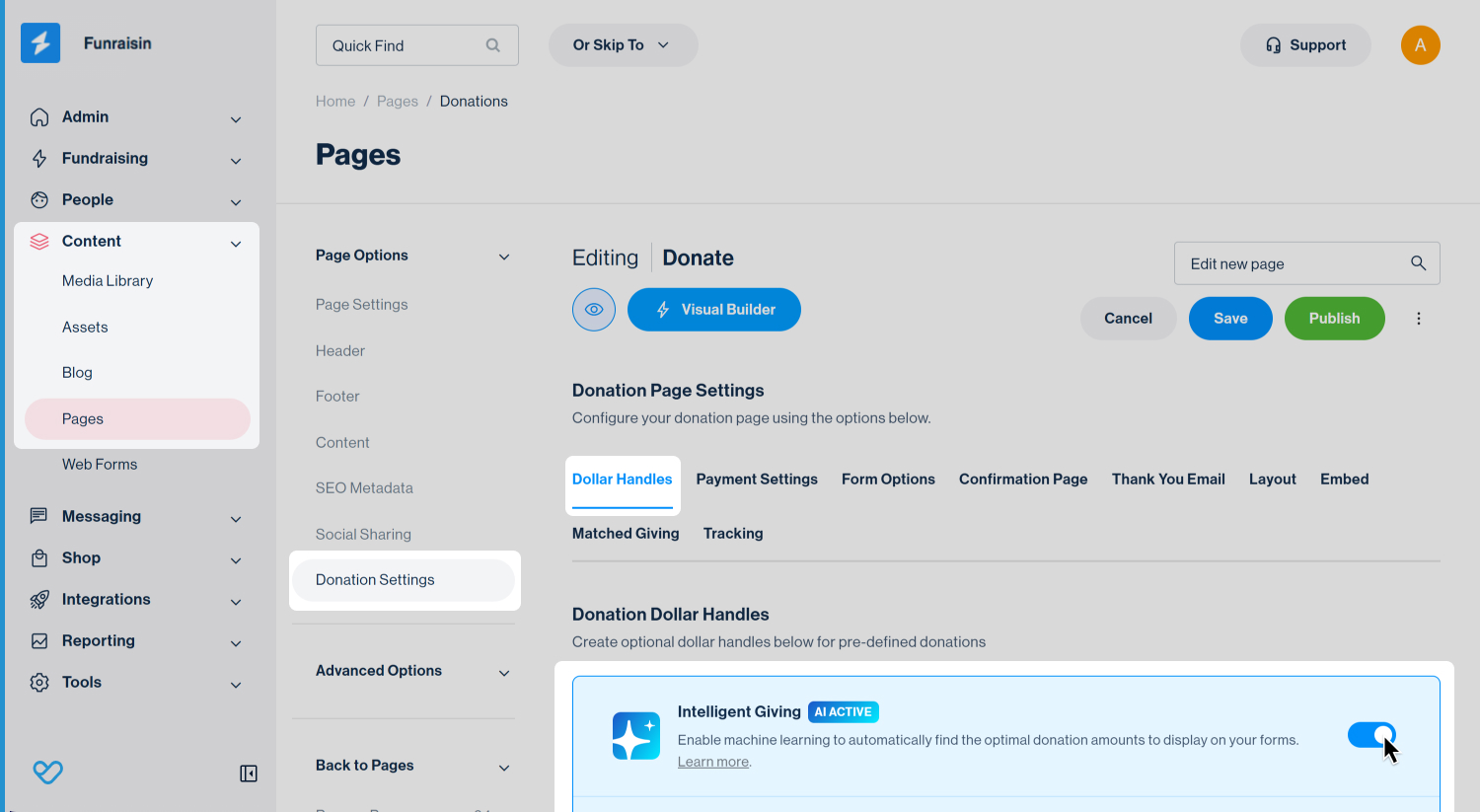
To activate Intelligent Giving using page settings:
- 1
- Locate the page by navigating to Content, then Pages
- 2
- Click on Donation Settings, then the Dollar Handles tab
- 3
- Toggle Intelligent Giving on
- 4
- Click Save and then Publish
Event level pages
Intelligent Giving can be enabled on event-level pages using the same steps as platform-level pages.
To enable Intelligent Giving on an event-level page:
- 1
- Go to Fundraising, then select Events and open the event
- 2
- Navigate to Event Pages
- 3
- Edit the page and enable Intelligent Giving using either Visual Builder or Page Settings, as outlined above
- 4
- Save and publish the page
Intelligent Giving default amounts
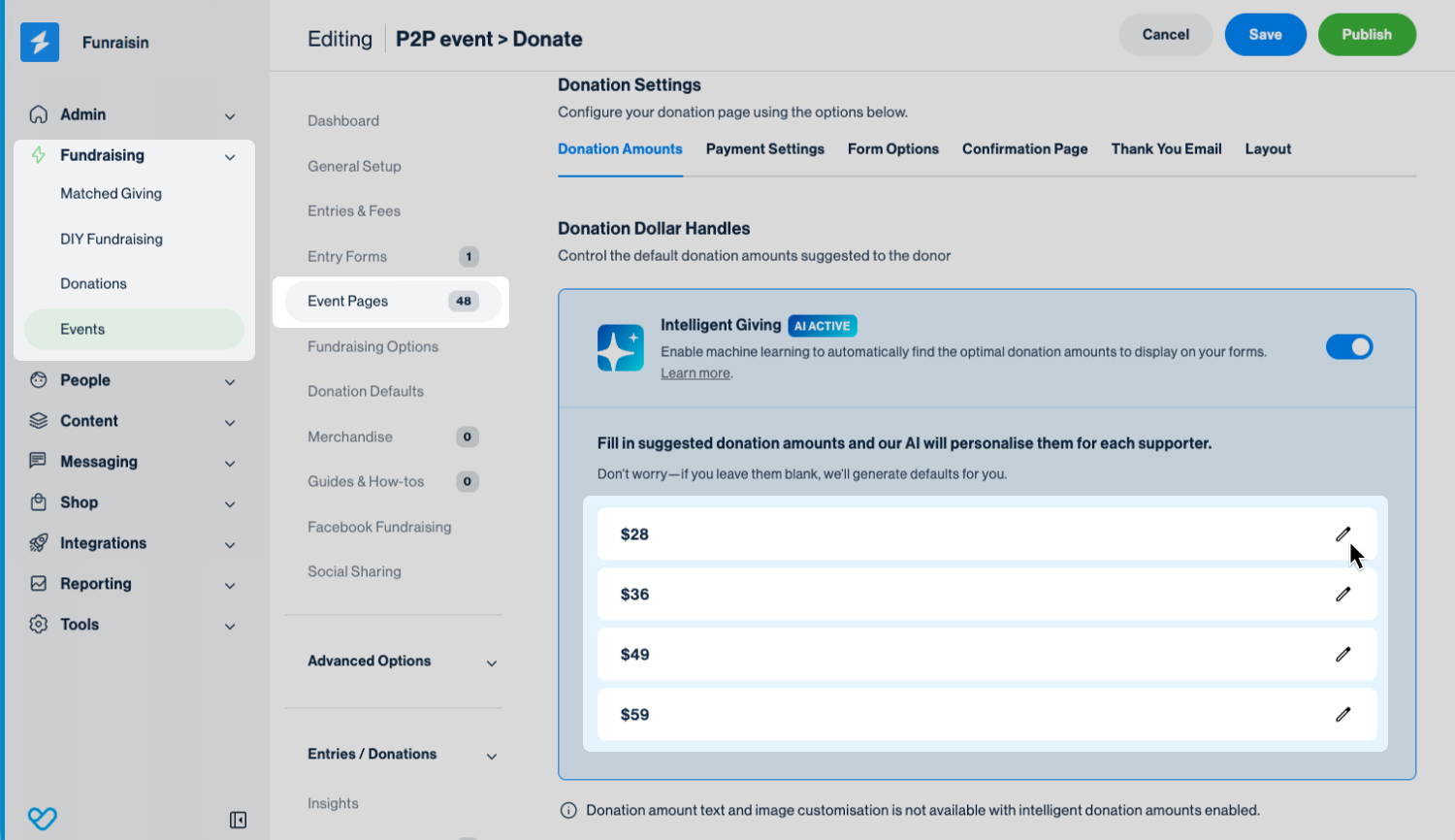
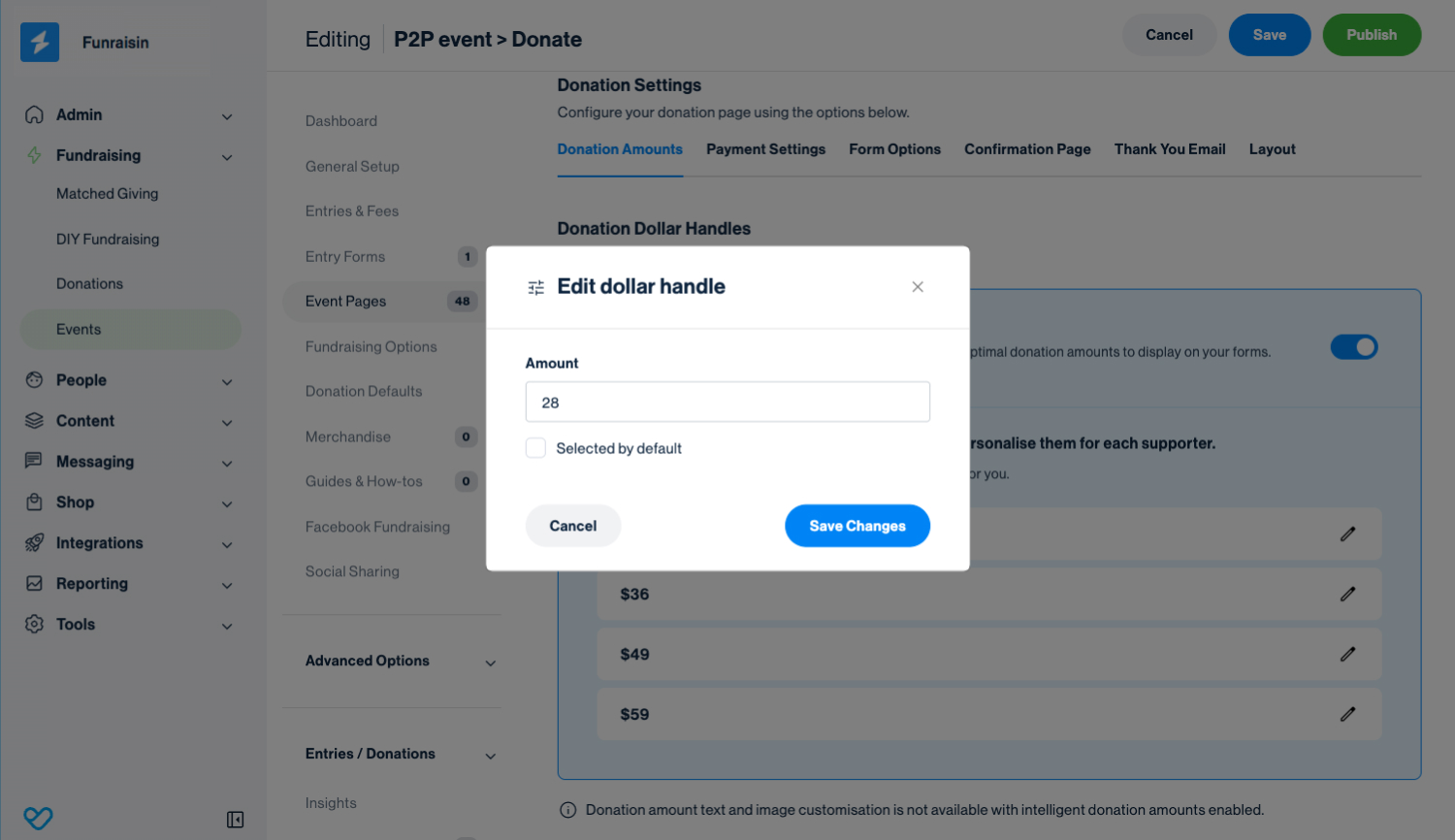
Once enabled, default donation amounts will be generated. These defaults are displayed to a donor if the information needed to generate donor-specific amounts isn’t available. These default amounts are also used as a reference for generating AI-optimised variations.
These amounts can be:
- Edited to set your own default values, or
- Left as generated, in which case the platform will automatically provide default values
The default Intelligent Giving amounts cannot be removed, only edited.
Like standard static dollar handles, you can preselect a default amount by editing the value and ticking Selected by default.
Still need help? Check out our other Donations support articles or reach out to the Funraisin Support team by logging a ticket through the Support Module in your platform.
Last updated: 25 Mar 2026
